
Why I built yet another Factorio calculator
Like every Factorio player, I eventually hit the point where the factory in my head outgrew the napkin math. So, like every Factorio player, I went calculator shopping.
There are some genuinely excellent calculators out there, and I used them for years. But there were a few things I always found missing:
- I wanted a way to define my own blueprints as I/O blackboxes.
- I wanted to use my train network as "measurable seams" between different parts of my factory.
- I was often perplexed by the UI. Regular Factorio calculator UIs are for (relatively) normal people. What I wanted though, was an IDE.
- I was never a huge fan of simplex (an algorithm used by most calculators out there). It just solves it for you. I wanted it to ask questions first.
- And finally, I'm a programmer. Just wanted to do some coding. Seemed (a bit) healthier than playing Factorio all the time.
And so, this contraption happened.
The JSON Calculator, in one screenful
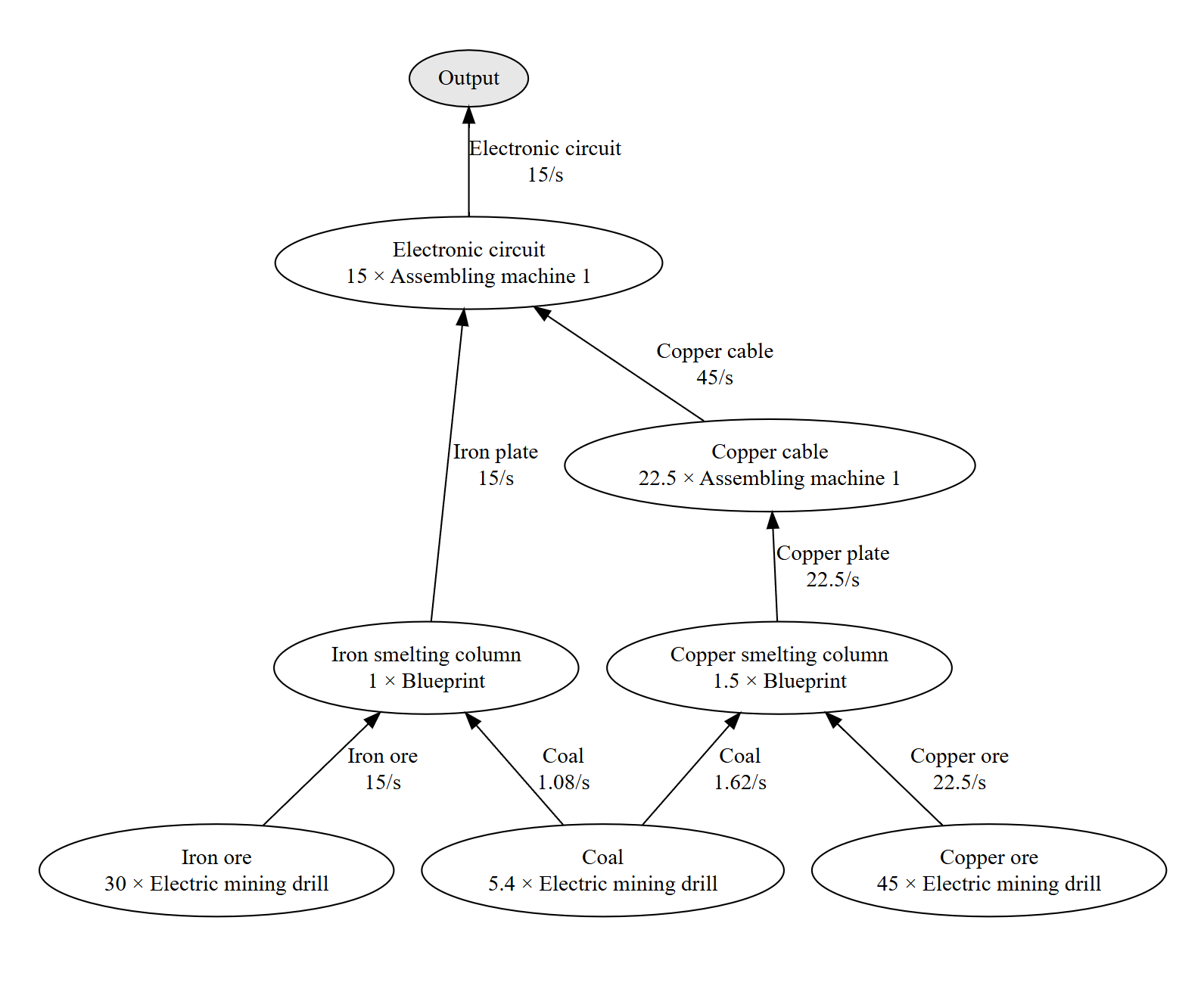
You write a JSON file (with comments — technically JSONC) in a proper code editor with autocomplete and inline docs. The calculator continuously turns it into a production graph. Here's a taste — note the two custom recipes:
{
  "demands": [
    "15/s electronic circuit"
  ],

  "customRecipes": [
    // Regular early game burner smelting columns.
    {
      "id": "iron-smelting-column-v1",
      "aliases": ["Iron smelting column"],
      // Easy: Get the ratios from the Rate Calculator mod.
      "inputs": ["15 iron-ore", "1.08 coal"],
      "outputs": "15 iron-plate",
    },
    {
      "id": "copper-smelting-column-v1",
      "aliases": ["Copper smelting column"],
      "inputs": ["15 copper-ore", "1.08 coal"],
      "outputs": "15 copper-plate",
    },
  ],

  "preferredRecipes": [
    "iron-smelting-column-v1",
    "copper-smelting-column-v1",
  ],

  // Tell the engine to prefer specific early game recipes.
  "preferredRecipeRegexps": [
    ".*:madeIn=assembling-machine-1",
    ".*:madeIn=electric-mining-drill"
  ],

  // And forbid all non-coal fuels for now.
  "forbiddenRecipeRegexps": [
    ":fueledBy=(?!coal)\\b"
  ],
}
How do you get the I/O ratios for your blueprints? Easy. Use one of the existing Factorio mods:
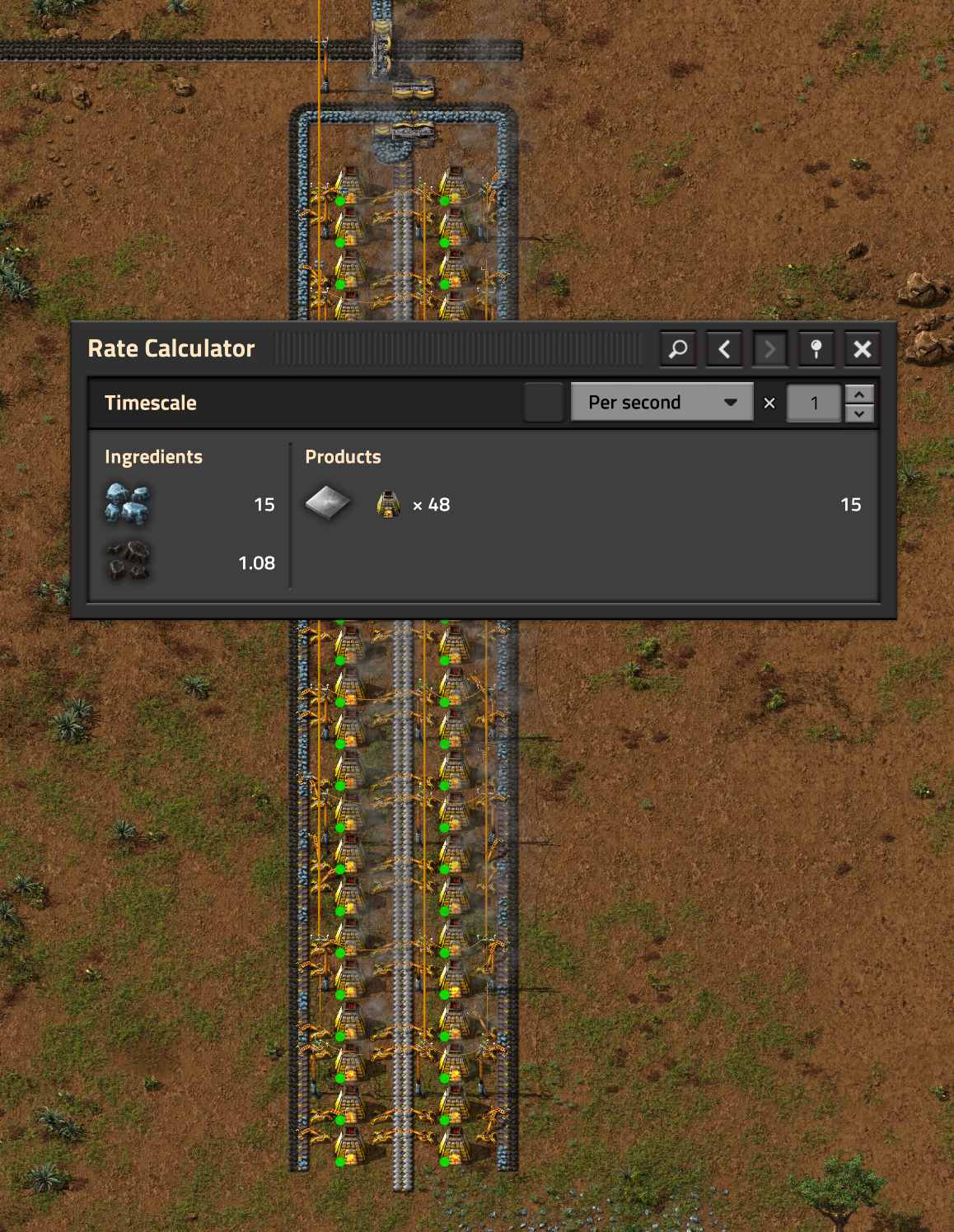
"inputs": ["15 iron-ore", "1.08 coal"], "outputs": "15 iron-plate"
The default algorithm is called greedy, and it's deliberately interactive:
whenever more than one recipe can produce something, it stops and asks you,
offering one-click suggestion buttons that edit the JSON for you. You end up with a file
that is an explicit, reviewable record of every decision — which recipe, made in which
machine, fueled by what. That's the "I want to control the wiring" itch, scratched.
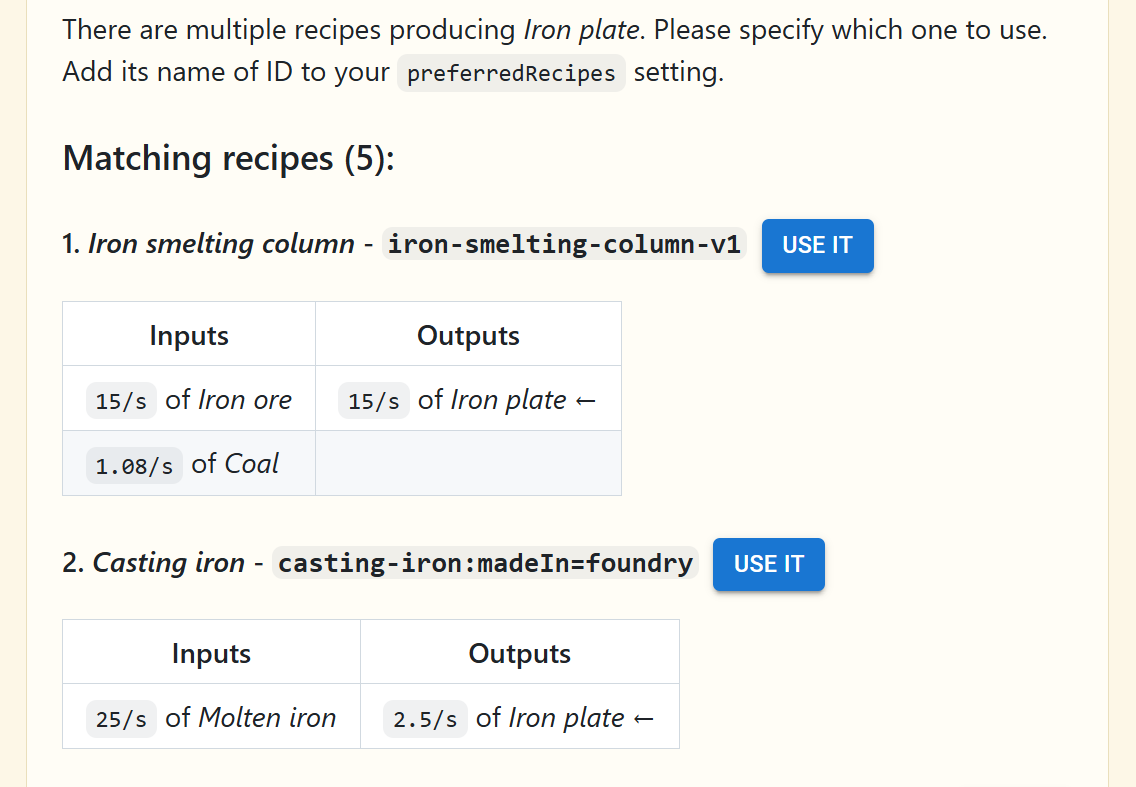
greedy algorithm. Whenever there are 2+
recipes to choose from, it will force you to pick one explicitly. It will never make a
decision for you (that's the primary difference between greedy and
simplex below).
Consumers, suppliers and trains
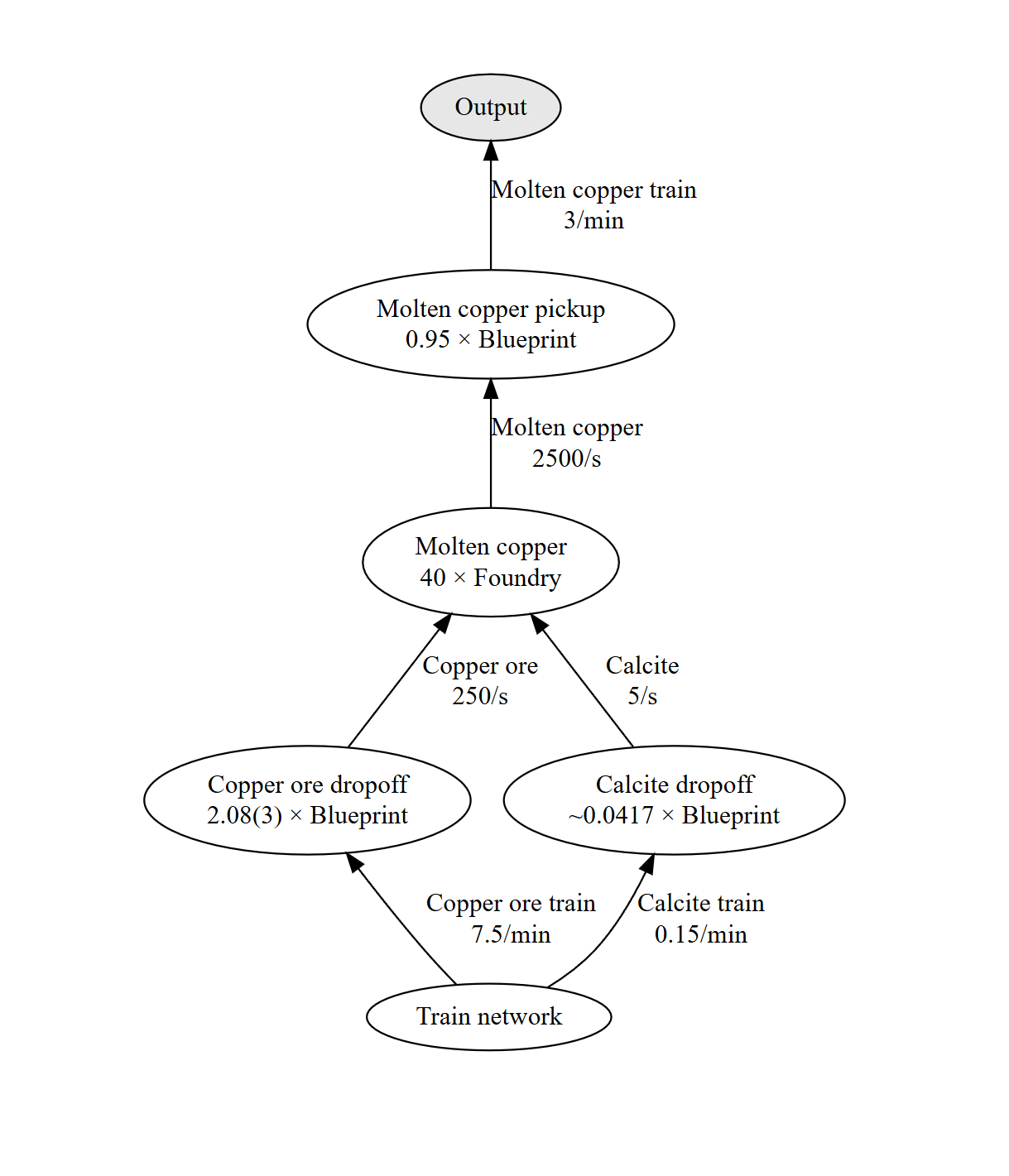
My factories are usually huge grids of blueprints, all aligned with my global train network. Each tile has input and output stations. Then I design each tile around how many input/output trains it can support.
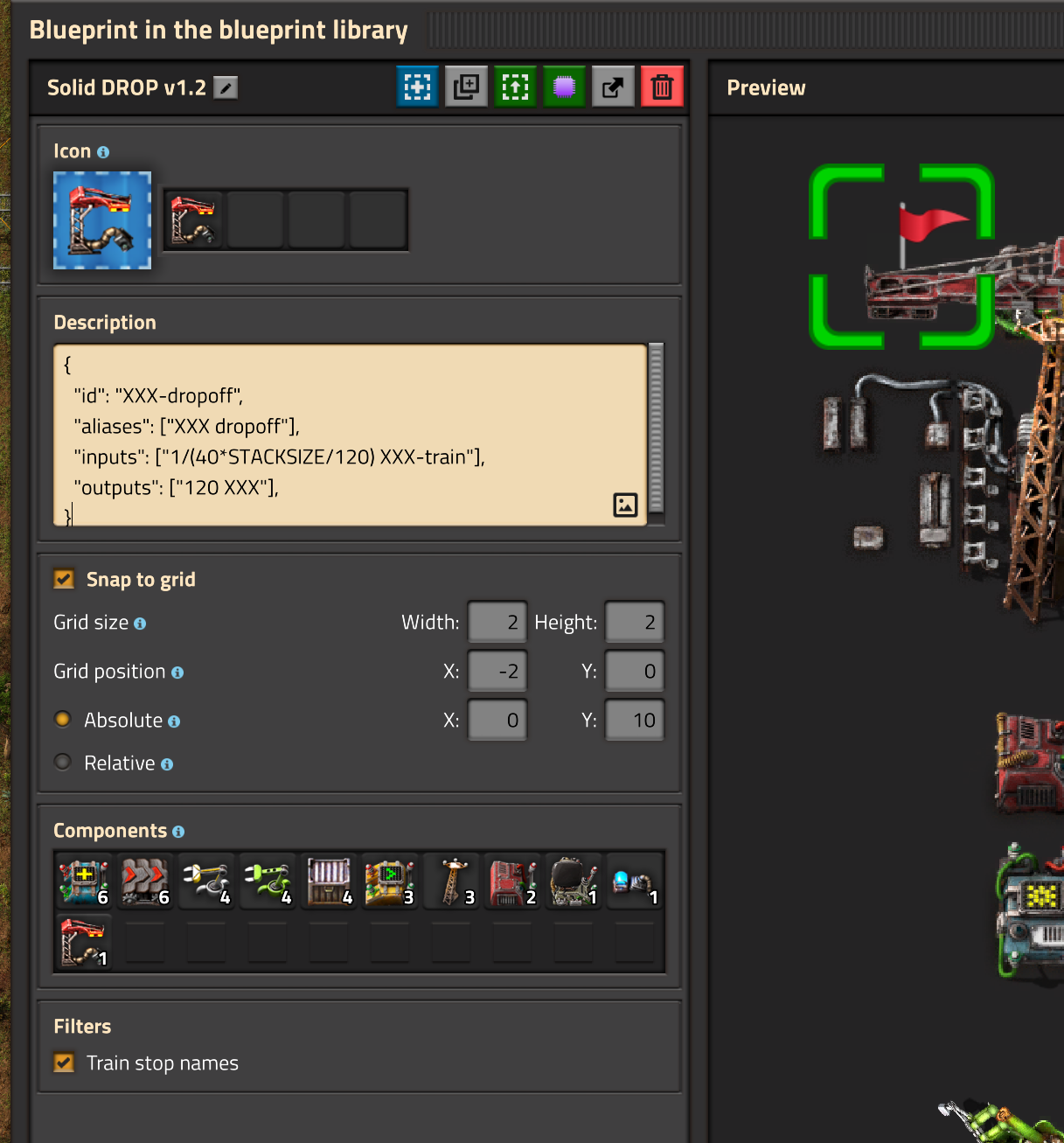
This means that I have different variants of my train stations, each with different throughput. I keep their JSON definitions along with my blueprints for fast copy-paste. Then use the JSON calculator to figure out how many stations I need where, and count stuff in trains-per-minute, instead of regular units.
{
  "demands": [
    "3/min molten-copper-train",
  ],

  "preferredRecipes": [
    "copper-ore-dropoff",
    "calcite-dropoff",
    "molten-copper:madeIn=foundry",
  ],

  "customRecipes": [
    {
      "id": "copper-ore-dropoff",
      "aliases": ["Copper ore dropoff"],
      "inputs": ["1/(40*50/120) copper-ore-train"],
      "outputs": ["120 copper-ore"],
    },
    {
      "id": "calcite-dropoff",
      "aliases": ["Calcite dropoff"],
      "inputs": ["1/(40*50/120) calcite-train"],
      "outputs": ["120 calcite"],
    },
    {
      "id": "molten-copper-pickup",
      "aliases": ["Molten copper pickup"],

      // Single wagon station. Time to fill one train with 3 pumps
      // and switch trains is roughly 19sec (50000/(3*1200) + 5).
      // So input is 5k/19sec, and output is 1 train per 19sec.
      // 3 pumps fill 5k in 14sec + 5 sec to switch trains.
      "inputs": ["50000/19 molten-copper"],
      "outputs": ["1/19 molten-copper-train"],
    },
    {
      "id": "trains",
      "aliases": ["Train network"],
      "outputs": ["copper-ore-train", "calcite-train"]
    }
  ],

  "customResources": [
    {
      "id": "copper-ore-train",
      "aliases": ["Copper ore train"]
    },
    {
      "id": "calcite-train",
      "aliases": ["Calcite train"]
    },
    {
      "id": "molten-copper-train",
      "aliases": ["Molten copper train"]
    },
  ],

  "displayUnitRegexps": {
    ".*-train": "/min"
  }
}
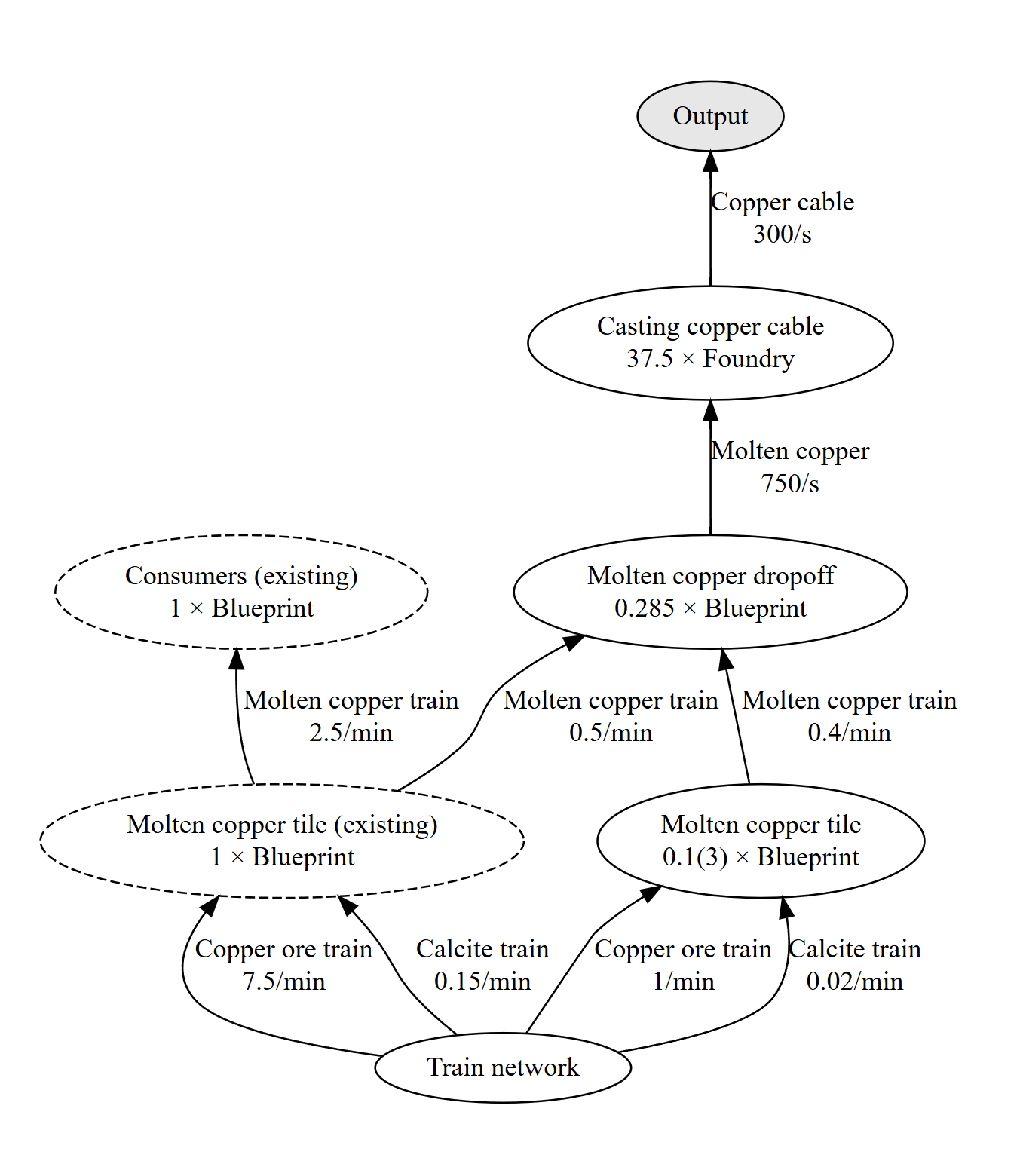
If you decide to go through with custom train definitions, you can later simulate flows between your custom tiles in trains, which looks kinda nice:
Of course, you don't need to count stuff in trains. You can just declare that your train network provides regular resources, not just full trains. This makes your JSON much smaller:
{
  "demands": [
    "3000 molten-copper",
  ],

  "preferredRecipes": [
    "trains",
    "molten-copper:madeIn=foundry",
  ],

  "customRecipes": [
    {
      "id": "trains",
      "aliases": ["Train network"],
      "outputs": ["copper-ore", "calcite"]
    }
  ],
}
Alternative algorithm: Simplex
Personally I prefer using the greedy algorithm most of the time (that's why
it's the default). I like the way it asks its questions top-to-bottom, DFS-style. But
sometimes it's not enough, as it doesn't solve for the same inputs coming from multiple
sources, etc.
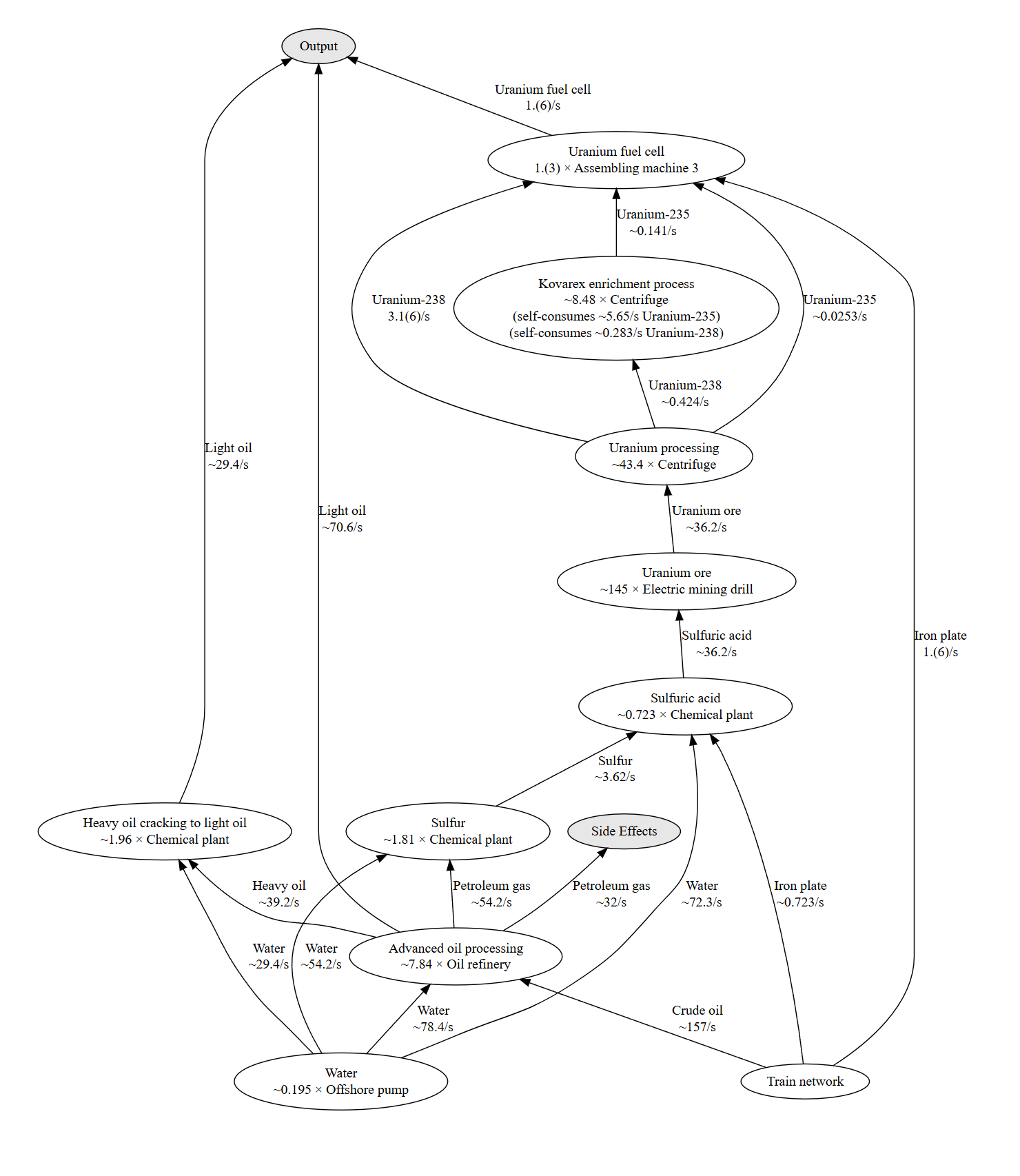
Oil processing and Kovarex enrichment are good examples of where a proper linear-programming
solver works better: set
"algorithm": "simplex"
and it balances the whole graph exactly — while still honoring your preferred, forbidden and
demoted recipes, and your custom blueprints.
{
  "demands": [
    "100/min uranium-fuel-cell",
    "100 light-oil"
  ],
  "algorithm": "simplex",
  "customRecipes": [
    {
      "id": "trains",
      "aliases": ["Train network"],
      "outputs": [
        "iron-plate",
        "crude-oil"
      ]
    }
  ],
  "preferredRecipes": [
    "trains",
    "uranium-fuel-cell:madeIn=assembling-machine-3",
    "advanced-oil-processing:madeIn=oil-refinery",
    "heavy-oil-cracking:madeIn=chemical-plant",
    "sulfur:madeIn=chemical-plant",
    "sulfuric-acid:madeIn=chemical-plant",
    "kovarex-enrichment-process:madeIn=centrifuge",
    "uranium-processing:madeIn=centrifuge",
    "uranium-ore:madeIn=electric-mining-drill",
    "water:madeIn=offshore-pump",
  ],
}
Simplex might also work well for you in Fulgora, if you want to route your recyclers precisely (crazy).
The honest fine print
Fair is fair — here's the section the other tools got, applied to mine:
- You edit JSON. For me that's the feature; if you'd rather click sliders, FactorioLab will make you happier.
- There's no module/beacon/quality math. My workaround is the tool's whole philosophy — measure your moduled blueprint with the Rate Calculator, then declare it as a custom recipe with its real rates — but if you want the calculator to do that arithmetic for you, others do.
- The recipe set is Factorio 2.0 + Space Age. No overhaul-mod data sets.
- It's a hobby project by one person, next to tools with years of polish.
My honest recommendation: checking ratios of something you already built? Rate Calculator, in-game. A quick vanilla answer? A flagship Factorio calculator. But if you think in blueprints, want to decide what connects to what, and feel at home in a text editor — that's exactly the player I built this for.
Getting started
Open the calculator — no account needed, your files live in your browser (optionally synced to the cloud if you sign in). It loads with a couple of example files (I update them sometimes, mostly when I give in to the addiction and play Factorio again).